Sometimes during iOS development, you want every run to start with a completely fresh app installation – without leftover UserDefaults, local files, or other application data. Or the need to click through three modals until the app is finally gone.
You can automate this in Xcode using a Scheme Pre-action.
Category: Quick Tip
-
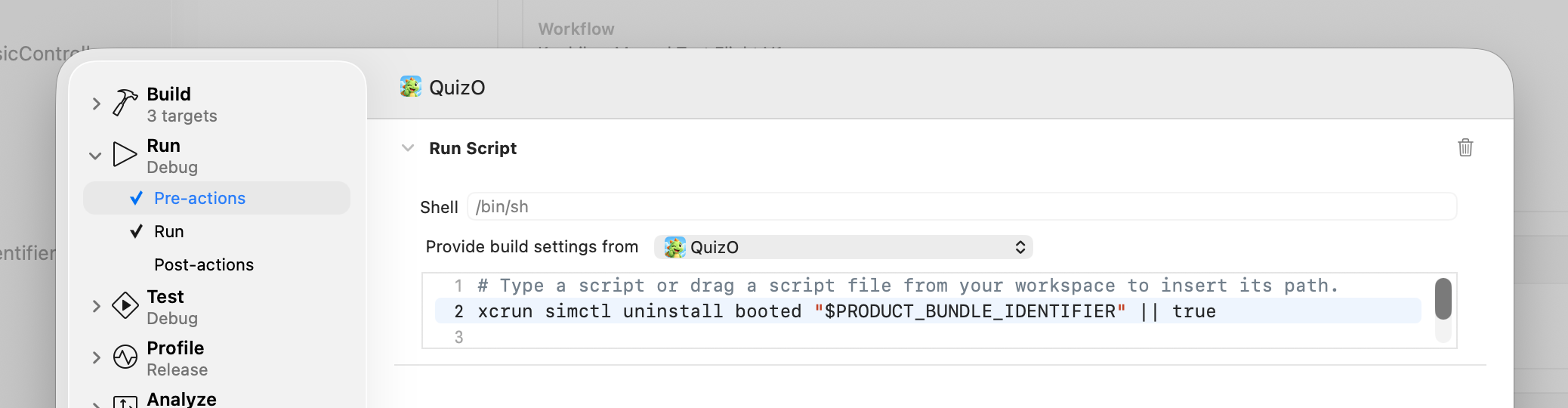
TIL: Automatically Uninstall an iOS App Before Running it in the Simulator
-

Quick Tip: Fix Cordova Access-Control-Allow-Origin error
A real lifesaver for cordova and ionic developers when you encounter CORS errors in the browser preview – Goto yourapp/platforms/browser/cordova/node_modules/cordova-serve/src/browser.js and change the chromeArgs line, adding the “–disable-web-security” flag:
-

Quick Tip: Could not find gradle wrapper within Android SDK. Might need to update your Android SDK.
If you try to build your ionic/cordova project running with
cordova build --release android
and the shell returns the following error
Could not find gradle wrapper within Android SDK. Might need to update your Android SDK.
the following worked for me:
cordova platform remove android
cordova platform add android
cordova platform update android@6.2.1
cordova build --release android
There is nothing wrong with your gradle installation nor with your Android SDK. It looks like an error specific to cordova 6.2.0 and was fixed in cordova 6.2.1. At the time of writing, cordova installed 6.2.0 instead of version 6.2.1, so you need to manually update.
-

Quick Tip: MySQL Workbench 6.3 (macOS Sierra) hangs on simple queries
Update: This issue is now fixed in MySQL Workbench 6.3.9
After upgrading MySQL Workbench 6.2 to 6.3, my Workbench displayed Mac’s spinning wheel of death almost all the time, even with the most simple query:
SELECT * FROM ecruite.MenuItem;
The queried table consists of 4 rows with 10 columns each and approx. 10 characters each. So it should be done in no time. Except if you’re using macOS Sierra and MySQL Workbench 6.3 you get the spinning wheel.
According to a user on SO, it’s a known bug and popped up with the introduction of a new security feature in Sierra: “Gatekeeper Path Randomization“.
As long as there is no bug-fixed version of MySQL Workbench, here is a workaround until MySQL releases a new version: