Windows Update comes with a sort of surprise this time for us firefox users. Microsoft .Net Framework 3.5 SP1 installs an extension named “Microsoft .Net Framework Assistant 1.0“. The add-on adds support for “Clickonce” and the ability to report installed .Net versions to the web server. Well, I suppose you neither like Microsofts way to distribute the add-on (no uninstall routine, the uninstall button is deactivated) nor the way Firefox handles access to your browser. So let’s get rid of it.
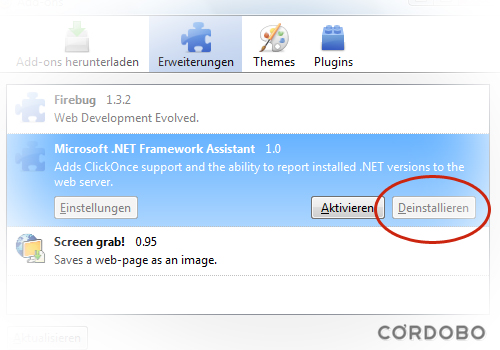
Screenshot of the Firefox “add-ons dialogue”. The uninstall option is disabled.
Uninstall the “Microsoft .Net Framework Assistant 1.0” add-on
- Hit “Start › Run › “regedit” – STOP! and hit “CTRL + SHIFT + ENTER” (“Run as Administrator”)
- Navigate to “
HKEY_LOCAL_MACHINE\SOFTWARE\Mozilla\Firefox\extensions“ - Right click on the entry “
{20a82645-c095-46ed-80e3-08825760534b}” and delete it - Navigate to “
HKEY_LOCAL_MACHINE\SOFTWARE\MozillaPlugins“ - Right click on the subkey “
@microsoft.com/WPF,version=3.5” and delete it - Open Firefox and enter “about:config” in the address bar
- Filter for “
general.useragent.extra.microsoftdotnet” and “microsoft.CLR.clickonce.autolaunch” and delete/reset the strings (if applicable) - Restart Firefox and goto “
C:\Windows\Microsoft.NET\Framework\v3.5\Windows Presentation Foundation“ - Rename the folder “
DotNetAssistantExtension” to “DotNetAssistantExtensionOld” and the fileNPWPF.dlltoNPWPF.dll.old(you can delete the folder and the file later if you don’t encounter problems)
This worked for me. I take no responsibility ;-)
Comments
9 responses to “Uninstall “Microsoft .Net Framework Assistent” Firefox add-on”
is this add-ons good for firefox or no
is it bad for firefox . plz tell me what it the problem with this add-ons
I don’t know if it’s good or not, but I don’t like software added to my browser.
OK IS THE ASSISTENT REMOVED?
By now you can use the uninstall option of the extension.
Someone should figure out a way to make the .net addon add software that has the computer check for updates every minute!
ddos, anyone?
MS instructions:
http://support.microsoft.com/kb/963707
nice post, worked well thanks
Concerning the comments about whether it’s good or not, I’d refer readers to Annoyances.org’s take on it: “this update adds to Firefox one of the most dangerous vulnerabilities present in all versions of Internet Explorer: the ability for Web sites to easily and quietly install software on your PC.” I’d say that’s bad… ;)
Reason I’m back looking for uninstall directions is this rose from the dead after installing Firefox 3.6. In fact, many other add-ons appeared that weren’t previously listed after installing 3.6. It apparently is much more strict in regards to add-ons, and is helping to expose those add-ons that have “snuck” on. Prosit!