Sometimes during iOS development, you want every run to start with a completely fresh app installation – without leftover UserDefaults, local files, or other application data. Or the need to click through three modals until the app is finally gone.
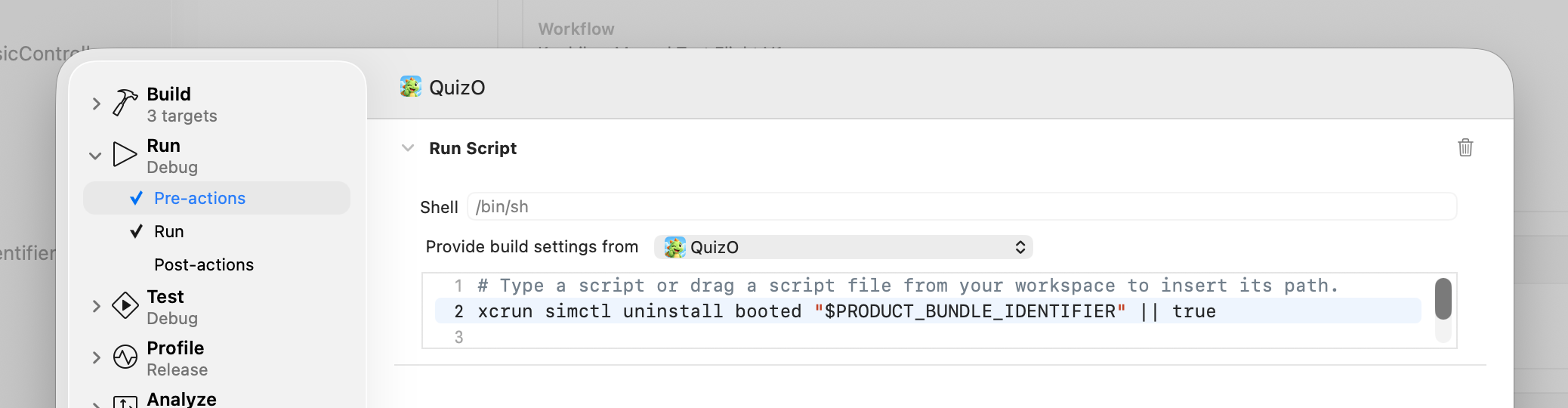
You can automate this in Xcode using a Scheme Pre-action.
A tiny simctl trick, but very useful when testing first-launch behavior or anything that depends on a clean application state.
Go to:
Product → Scheme → Edit Scheme… → Run → Pre-actions
Add a Run Script Action with:
xcrun simctl uninstall booted "$PRODUCT_BUNDLE_IDENTIFIER" || true
$PRODUCT_BUNDLE_IDENTIFIER gets replaced by Xcode with you app’s bundle identifier in the form of com.example.MyApp.
booted targets the currently running iOS Simulator.
|| true ensures that the script doesn’t fail when the app isn’t installed yet.
Now every time you run the app, Xcode will:
1. Uninstall the existing app from the simulator
2. Build the new version
3. Install it with a fresh data container
4. Launch it
Leave a Reply