Sometimes during iOS development, you want every run to start with a completely fresh app installation – without leftover UserDefaults, local files, or other application data. Or the need to click through three modals until the app is finally gone.
You can automate this in Xcode using a Scheme Pre-action.
Category: Development
-
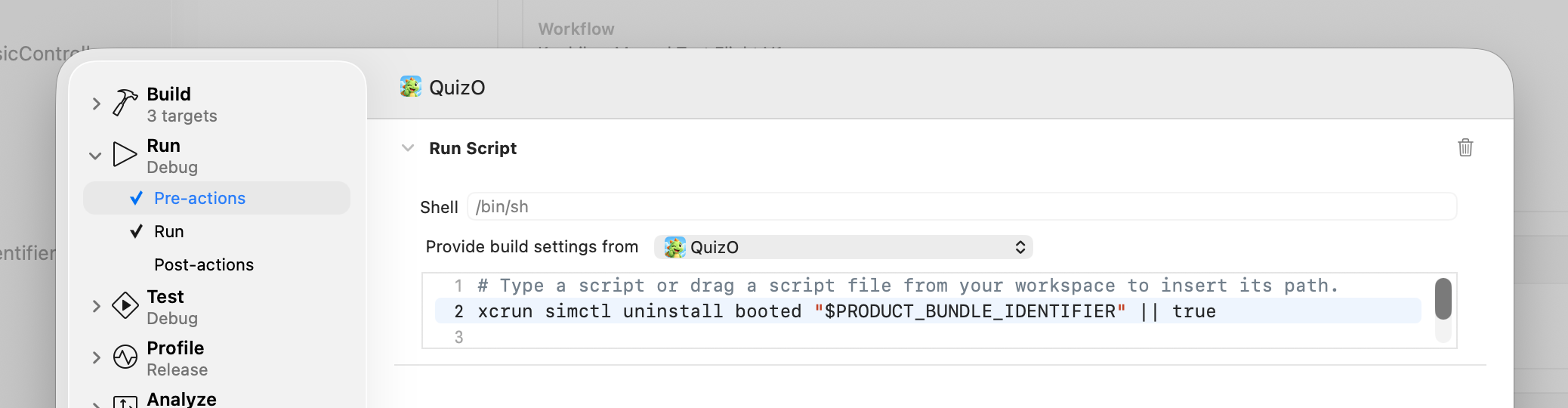
TIL: Automatically Uninstall an iOS App Before Running it in the Simulator
-

Quick Tip: Fix Cordova Access-Control-Allow-Origin error
A real lifesaver for cordova and ionic developers when you encounter CORS errors in the browser preview – Goto yourapp/platforms/browser/cordova/node_modules/cordova-serve/src/browser.js and change the chromeArgs line, adding the “–disable-web-security” flag:
-
Angular QR Code Generator Component
Update: Latest update supports Angular 22 and standalone components.
How to: angularx qrcode with standalone components.
Say hello to my new Angular QR Code module, called angularx-qrcode. It’s not only a drop-in replacement for the no-longer-maintained
ng2-qrcodecomponent to generate and display QR Codes, it’s as well heavily optimized for Angular and Ionic.angularx-qrcode supports Angulars Ivy compiler and AOT Compilation (Ahead-of-Time Compilation), which results in significant faster rendering. It’s as well available as webpack’ed common.js and es2015-module and open-sourced under the MIT licence.
-

Quick Tip: Could not find gradle wrapper within Android SDK. Might need to update your Android SDK.
If you try to build your ionic/cordova project running with
cordova build --release android
and the shell returns the following error
Could not find gradle wrapper within Android SDK. Might need to update your Android SDK.
the following worked for me:
cordova platform remove android
cordova platform add android
cordova platform update android@6.2.1
cordova build --release android
There is nothing wrong with your gradle installation nor with your Android SDK. It looks like an error specific to cordova 6.2.0 and was fixed in cordova 6.2.1. At the time of writing, cordova installed 6.2.0 instead of version 6.2.1, so you need to manually update.