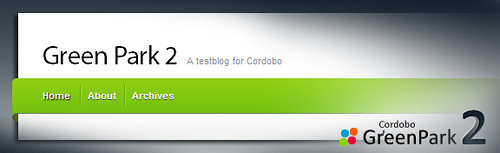
Cordobo Green Park 2 (GP2) has reached the Beta status after 8 Alpha revisions. The download is available at my WordPress Themes Page.
Apart from a new header graphic and more appealing forms and buttons, GP2 comes with a lot of code and CSS improvements, to render the website even faster along with typography and SEO optimizations. The Beta needs ~3KB less code on each created page compared to the latest alpha. The new settings page located at the WordPress Admin section, to configure Feedburner, Adsense and Analytics, has been cleaned up although.
Download Green Park 2 Beta 4 | Demo (Changelog)
Like it? Buy me a cup of coffee ;)
As you might know, coders love coffee — and I need a lot. If you like my free themes, feel free to send me 1$ for a coffee.
Comments
180 responses to “Cordobo Green Park 2 Beta 4”
Beta 5 change log looks greats! :D i can’t wait to download it!
V-Gates Andreas!
Is there any way to have the comment box pop out right at the spot where the “comment” link is (instead of it scrolling down to the bottom of the page?)
Danke,
Nancy : )
Hi Nancy,
“V-Gates” sounds like “Wie geht’s” (“how are you doing” in German) ;-)
Do you mean on top of the commentslist where it says “Add your comment” or the AJAXy effect if you click on “Reply”?
For the 2nd option here is no solution because it needed to change WordPress core files.
very nice themes
thanks you a lot
I wish you more success
hi man,
when should we get the Beta5?
Very much looking forward to the Beta5.
Andreas
Great theme (now that I’m understanding how to move things around).
How would I go about setting up a page like this using the blog? – http://boxedindesign.com/top-lists/
As you can see, I made an effort but adding the php to it so it dynamically populates has proven tough for me. I want each page to show up all the posts assigned to that specific category but in the format I have tried to display on the link above.
Any ideas?
Oh, had site up for only 5 days and already received over 1000 visitors! :)
Thanks!
– Ken
I’m running into an issue where after I log into my site if i go back and view the site the login text doesn’t change to “admin” or “manage” like it did in other themes. Is there a fix for this or am I just missing something? Thanks in advance!
Hi, this might be the result of a caching plugin for WordPress or of your browsers cache – try a different configuration if you use a caching plugin like “wp super cache” or try reloading the website various times.
In the top navigation “Login” should be replaced with “Site Admin | Log out” if you’re logged in.
I am blind in seo and php, so what this code means in cordobo header. Just wondering, is it legal?
<?php
if (isset($_SERVER['HTTP_REFERER']) && strpos($_SERVER['HTTP_REFERER'], 'images.google.com'))
echo '
if (top.location != self.location) top.location = self.location;
‘;
?>
Hi,
it’s “legal” code ;)
It redirects visitors from Google Image Search to the respective page.
Can you please tell me where how to get the buttons across the top to direct to categories? I saw many people asking and you never responded. I have read lots of pages in your site and all 159 commets (actually read them) and I can’t find the answer. Please help. Ty!
Hi Ty,
open header.php (create a backup copy first so you can go back at any time) and find
<?php greenpark_globalnav() ?>Replace it with
<?php wp_list_categories('show_count=0&title_li='); ?>save the file and upload it to your themes folder.
If you want to tweak it, so only certain categories show up, you’ll find some helpful documentation here:
http://codex.wordpress.org/Template_Tags/wp_list_categories
HTH
Great! I appreciate the help and love the theme more. :)
At the end of the other message I wrote Ty! – it was short for thank you.
Thanks again!
– Ken
Hi Ken,
Oops, sorry, I didn’t know that… Thanks for heping me out ;)
In this wordpress theme, when i reply any comment in my blog, comment reply CSS not working as like your blog. Here i have replied a comment in this page. http://www.bsnlinfo.co.in/configure-wa3002g4-bsnl-broadband-modem-to-access-internet-connection-via-lan-and-wi-fi/comment-page-1/#comment-34
But in this blog, your comment reply aligned in right. How could i apply the same CSS for my blog?
I found the exact technical term for the above question. How to enable nested comments feature in out theme? :)
There is no special way to enable nested comments (or threaded comments), go to
worpress admin > Settings > Discussion Settings
I have nested comments enabled 5 levels deep
Nested comments Now works like a charm :D
Hello,
When i using search function in this theme, in search results page, Sub pages also listed in top navbar. How can i disable the pages in search results page? Here is the example
http://www.bsnlinfo.co.in/?s=hello
When i search the above term in my blog, in top navbar, my blog pages are showing. How can i avoid pages in top navbar in search results page?
It only shows when there the search can’t find anything. For me at least, have wp 2.8.4 and run latest firefox on a mac
It’ll be fixed with the next beta. Thanks for the reports.